Beaver Builder – Dynamic WordPress Page Builder
- Last Update: February 1, 2025
- Justin Busa
- Utilities

| Plugin Name: | Beaver Builder |
|---|---|
| Author: | Justin Busa |
| Latest Version: | 2.8.6.2 |
| Active Installation: | 100,000+ |
| Plugin Category: | Utilities |
Table of Contents
Introduction
Beaver Builder is a powerful and flexible drag-and-drop page builder for WordPress. It allows users to create stunning, professional-looking pages without writing a single line of code. Whether you are a beginner or an experienced developer, Beaver Builder offers a user-friendly interface that makes designing websites a breeze.
Features
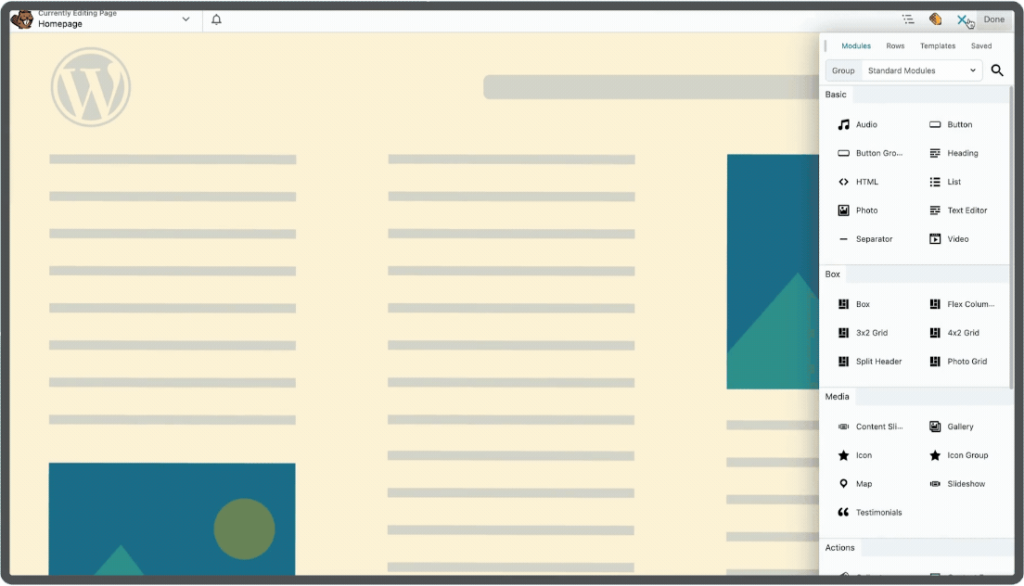
Beaver Builder comes packed with a variety of features that cater to different needs. It includes content modules such as text editors, photo galleries, buttons, and more. Users can create full-width, column-based layouts and even use flexbox and CSS grid layouts with the Box Module. The plugin ensures that all designs are mobile-friendly and responsive, providing a seamless experience across all devices.
Premium Support and Community
The Beaver Builder team offers premium support to its users, ensuring that any issues are resolved promptly. There is also a vibrant community of Beaver Builder users who are always ready to help. Users can join the Official Facebook Group or Slack Channel to connect with other enthusiasts, share projects, and get advice.
Compatibility and Performance
One of the standout features of Beaver Builder is its compatibility with almost any WordPress theme. This means users can integrate it into their existing websites without any hassle. Additionally, this builder is optimized for performance, loading only the necessary assets for each page, which ensures fast loading times.
Important Features
Content Modules
– Text Editor
– Photo Gallery
– Buttons
– Call to Action
– Icons
– Menus
– Audio and Video
Layout Options
– Full-width, column-based layouts
– Flexbox and CSS grid layouts with the Box Module
– Mobile-friendly and responsive designs
Customization
– Add custom CSS classes and IDs
– Use WordPress Widgets and shortcodes
– Create and save custom modules
Performance
– Lightweight and semantic markup
– Optimized for fast loading times
– Loads only necessary assets for each page
Compatibility
– Works with almost any WordPress theme
– Compatible with ClassicPress
Premium Features
– Additional modules like Contact Form, Tabs, Slider, and more
– Beaver Themer Theme Builder
– Beautiful pre-made layout templates
– Save, export, and reuse layouts
Community and Support
– Access to expert support team
– Active community on Facebook and Slack
– Extensive knowledge base and tutorials
– Premium support for license holders
– Free online courses and video tutorials
Integrations and Add-Ons
– Advanced analytics and eCommerce solutions
– Marketing automation tools
– Live chat, social feeds, and forms
– Seamless navigation and engagement tools
Templates
– Collection of premium templates
– Mobile responsive designs
– Templates for contact pages, newsletter sign-ups, and more
– Available at Assistant.pro
Frequently Asked Questions (FAQs)
1. What is Beaver Builder?
Beaver Builder is a drag-and-drop page builder plugin for WordPress that allows users to create custom layouts and designs without writing any code. It is suitable for both beginners and experienced developers.
2. Is Beaver Builder compatible with my WordPress theme?
Yes, this plugin is designed to work with almost any WordPress theme. You can integrate it into your existing website seamlessly.
3. Does Beaver Builder offer support?
Yes, it offers premium support to its users. There is also a vibrant community on Facebook and Slack where users can get help and share their experiences.
4. Can I use Beaver Builder on multiple websites?
Yes, depending on the license you purchase, you can use Beaver Builder on multiple websites. The plugin offers different plans to suit various needs.
5. Are there pre-made templates available in Beaver Builder?
Yes, this plugin includes a collection of pre-made templates that you can use to quickly create stunning websites. These templates are mobile responsive and can be customized to fit your brand.
6. What are the premium features of Beaver Builder?
Premium features include additional content modules, the Beaver Themer Theme Builder, beautiful pre-made layout templates, the ability to save and reuse layouts, and access to expert support.
Conclusion
In summary, Beaver Builder is an excellent choice for anyone looking to build or enhance their WordPress website. Its intuitive drag-and-drop interface, extensive features, and strong community support make it a valuable tool for both beginners and professionals. With Beaver Builder, creating beautiful, responsive websites has never been easier.
Ready to Build Your Next Website?
Give Beaver Builder a try and see how easy it is to create stunning WordPress pages—no coding required! Whether you’re launching a new project or revamping your current site, Beaver Builder has your back.
And start building today!
Disclaimer: This article might contain affiliate links, meaning we may earn a commission if you click through and make a purchase at no extra cost to you.